eInvoice Generator for Gravity PDF · paid add-on

One invoice, three e-invoicing formats.

eInvoice Generator for Gravity PDF turns the invoice that Gravity PDF already creates into an e-invoice. Your form, your template and your workflow stay as they are, and your customer receives a PDF that looks exactly like before. From the same invoice, you can create Factur-X / ZUGFeRD, XRechnung and PEPPOL BIS Billing 3.0, all on your own server.

Why this matters: since 2025, German businesses have to be able to receive e-invoices. From 2027, larger businesses also have to issue them, and from 2028 all of them do. An e-invoice is an invoice as a structured XML file that a program can read. An invoice that is only a PDF will then no longer count. Gravity PDF is the extension that creates a PDF file from a completed Gravity Forms form.

1 · Form completed
in Gravity Forms
2 · PDF is created
by Gravity PDF, as before
3 · XML is checked
against the schema
4 · E-invoice ready
ZUGFeRD, XRechnung, PEPPOL
How the e-invoice comes about: the completed form becomes a PDF as usual, and the add-on creates the XML, checks it and delivers the formats you chose.

The three formats

The format your recipient needs.

Format How it is delivered Typical recipient
Factur-X / ZUGFeRD The XML invoice according to EN 16931 in CII format is embedded in the PDF. The PDF is rewritten as PDF/A-3 in the process. business customers
XRechnung a separate XML file in UBL format next to the PDF public-sector buyers
PEPPOL BIS Billing 3.0 a separate XML file in UBL format next to the PDF recipients on the PEPPOL network

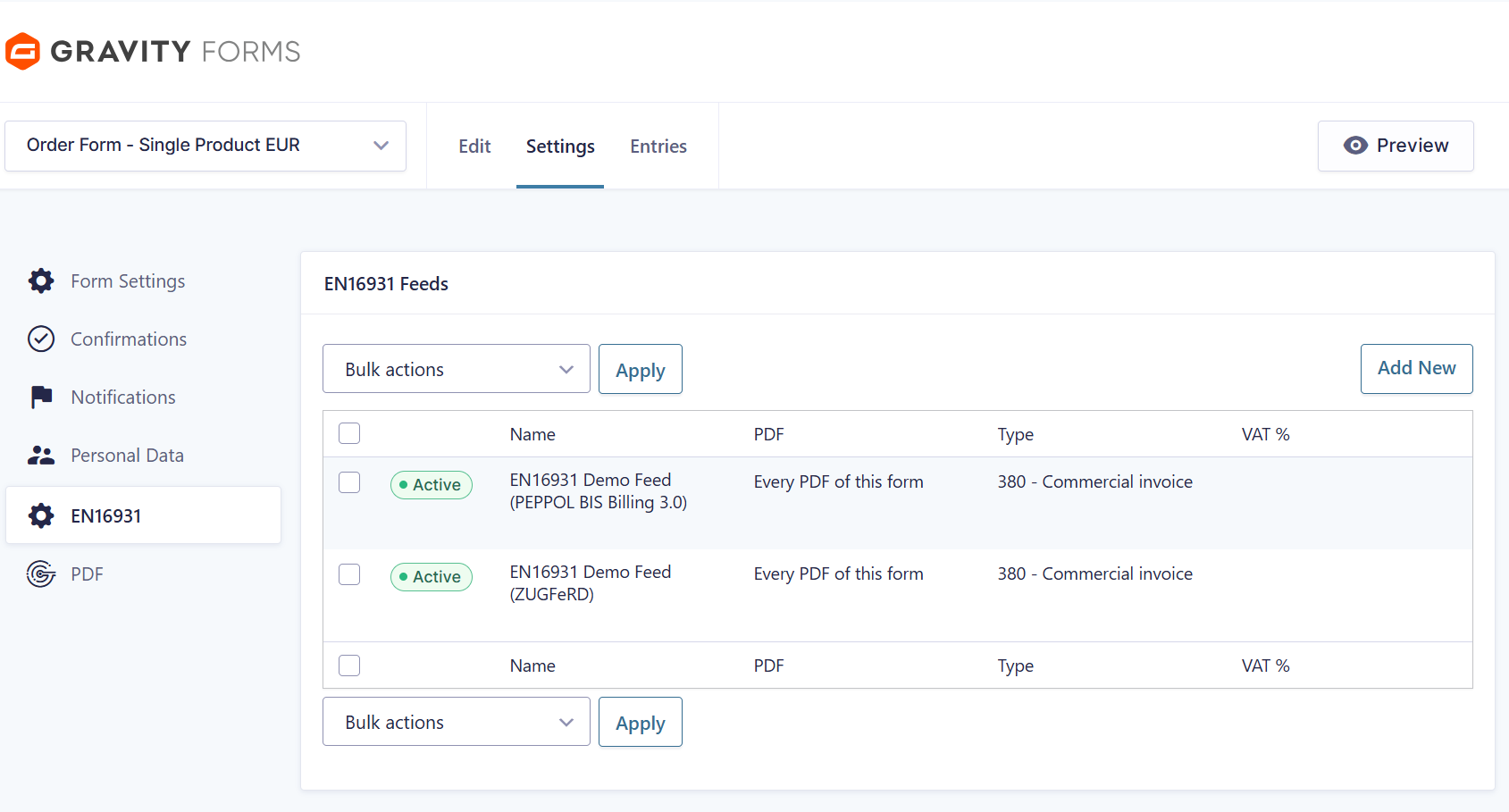
You can choose any combination of these formats, per feed. A feed is a mapping that defines which PDF is created from which form. Because all formats are built from the same assembled invoice, they can never contradict each other.

In short: ZUGFeRD and Factur-X are the same thing, a PDF with an embedded XML invoice. In Germany it is called ZUGFeRD, in France Factur-X. XRechnung is the German standard for e-invoices to public authorities. PEPPOL is a European network for exchanging e-invoices between businesses and public authorities. UBL and CII are the two XML forms in which an e-invoice according to EN 16931 can exist.

XRechnung and PEPPOL invoices are not a hybrid of PDF and XML, so the add-on writes them as separate files. Each file gets its own download link in the entry view and can be attached to a notification email next to the PDF. This way, every invoice reaches its recipient in the form they expect.

For Factur-X, you can choose the profiles EN 16931 (Comfort), EXTENDED, BASIC and XRechnung 3.0. A profile defines how extensive the details in the embedded XML are.


Where the figures come from

The printed invoice and the XML cannot contradict each other.

Read from the invoice, not from a second source

The Gravity PDF invoice template already contains the invoice number, the due date and the VAT rate. The add-on reads these values straight from the template and hides its own fields for them. So there is no second copy you would have to keep in sync, and nothing can drift apart.

The invoice number follows gfpdf_invoice_number

If a counter add-on gives the printed invoice a new number, the XML receives the same number. For this, the add-on respects the gfpdf_invoice_number value of Gravity PDF.

The payment means follows the payment gateway

If an order was paid through PayPal or Stripe, the add-on reports it as a payment through an online payment service, and a card payment as a payment by bank card. An entry without a payment gateway gets the code you choose in the settings. Developers can add more payment gateways through a filter.

Correct arithmetic, checked five ways

The add-on checks line totals, allowances, charges, the VAT breakdown and the grand total against the calculation rules that EN 16931 defines. This also covers the awkward case of an untaxed shipping line, which needs a VAT category of its own with a zero rate.

Enter the seller once

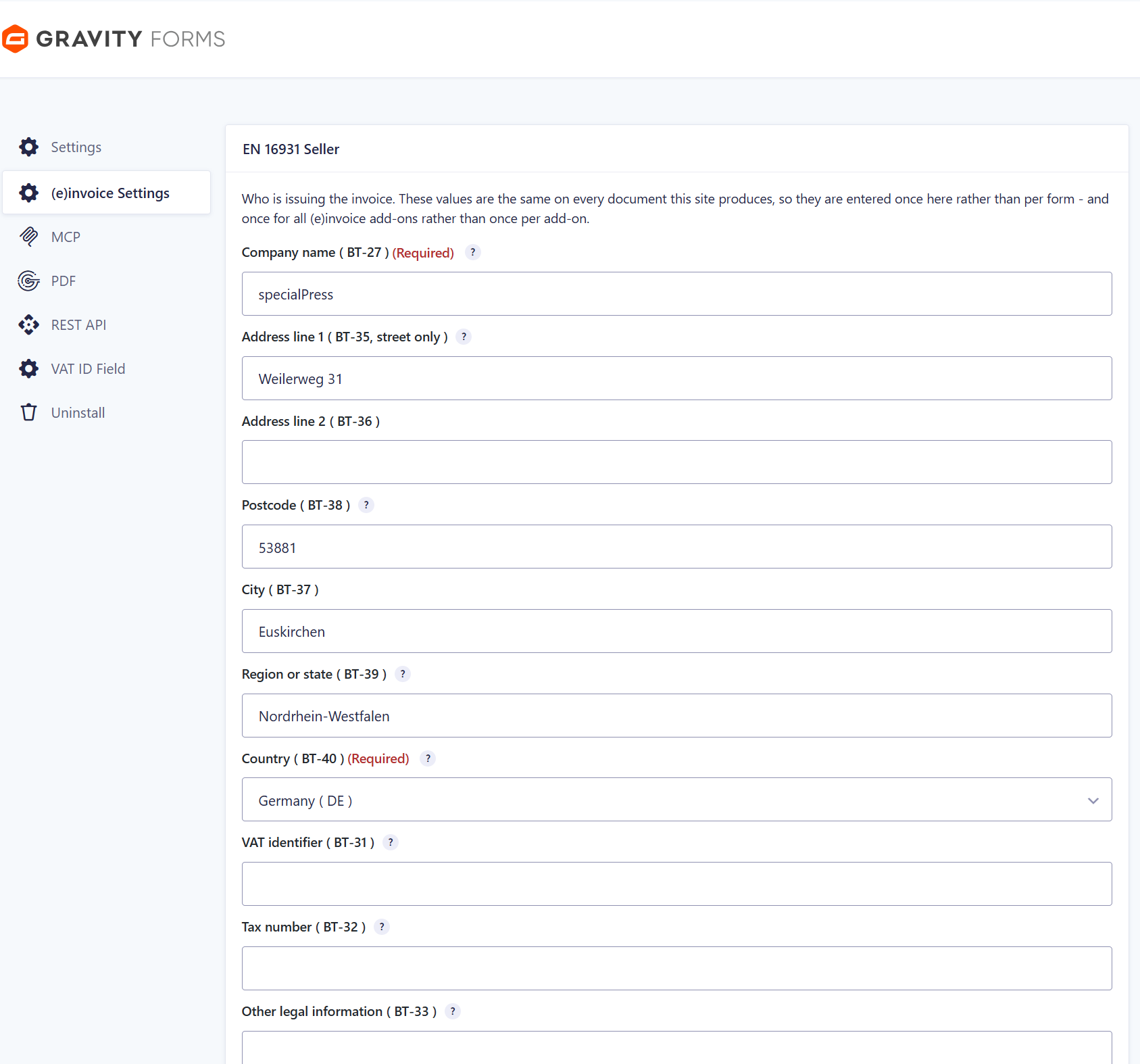
You enter the company name, address, VAT ID (VAT identification number), tax number, bank details and contact details only once, on the shared settings page (e)invoice Settings instead of in every feed. The other add-ons of the family read the same values, so you maintain them in a single place.

Only mandatory fields are marked as mandatory

The screen follows the rules of EN 16931: the seller name and the country code are mandatory, a street is not. You never have to fill in a field whose value the add-on already knows. The country list comes from Gravity Forms itself, so “DE” means the same in both places.


Built not to break

The PDF always stays intact.

Checked against the schema on every run

A schema, also called an XSD, describes the allowed structure of an XML file. The add-on checks every XML it creates against this schema. If the XML fails the check, your PDF stays unchanged, and no faulty e-invoice is delivered. The error is logged rather than swallowed, and your customer still receives the usual Gravity PDF document instead of an error page.

Up to date even after an entry is corrected

If you change a value in the entry and fetch the PDF again, the add-on rebuilds the document and the XML from the current entry. So you never receive an outdated file.

It tells you what is wrong

If a library is missing, the seller block is incomplete or a form has no PDF, the add-on says so in a clear sentence on the feed screen, before you configure anything. If an error only occurs when the PDF is created, it appears in the Gravity Forms log.

The interface is available in German, English and French. The field names are taken verbatim from the Factur-X specification and not translated by hand. The add-on uses no external service, needs no API key and opens no outbound connection. Your invoice data stays on your server.


Requirements

What has to be in place.

WordPress 6.0 or newer
PHP 8.2 or newer
Gravity Forms 2.5 or newer, with a payment or product field
Gravity PDF 6.0 or newer

The Gravity PDF invoice template is recommended but not required. The library that creates CII and PDF/A-3 ships with the add-on, so no Composer step is needed. Composer is the tool used to install additional PHP libraries.


Setup

Four steps, then it runs on its own.

01 Fill in the seller once

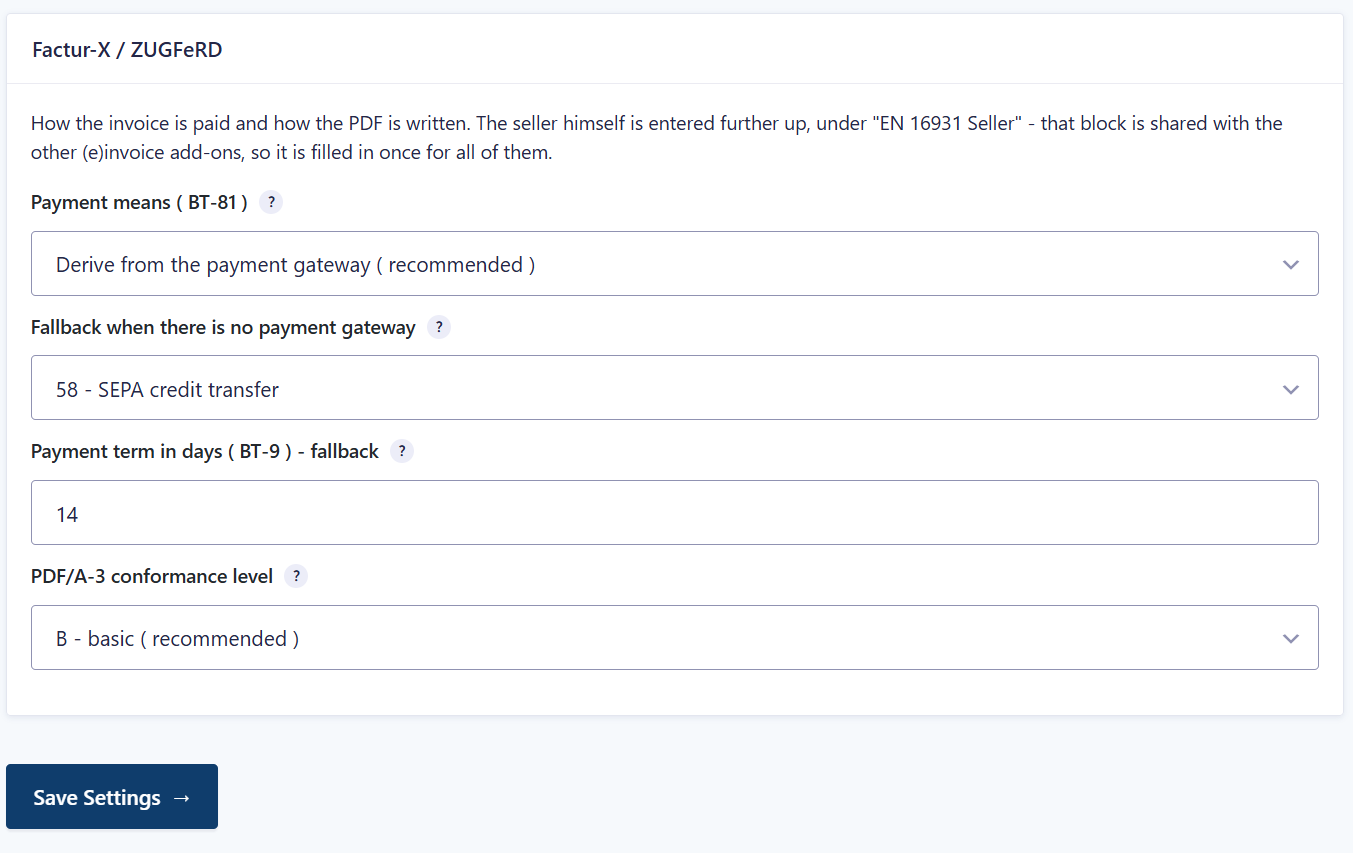
Company name, country and either a VAT ID or a tax number are the minimum the standard requires. These details are on the shared page (e)invoice Settings. You will also find the Factur-X block there, with payment means, payment term and PDF/A-3 level.

02 Add a feed and tick the formats

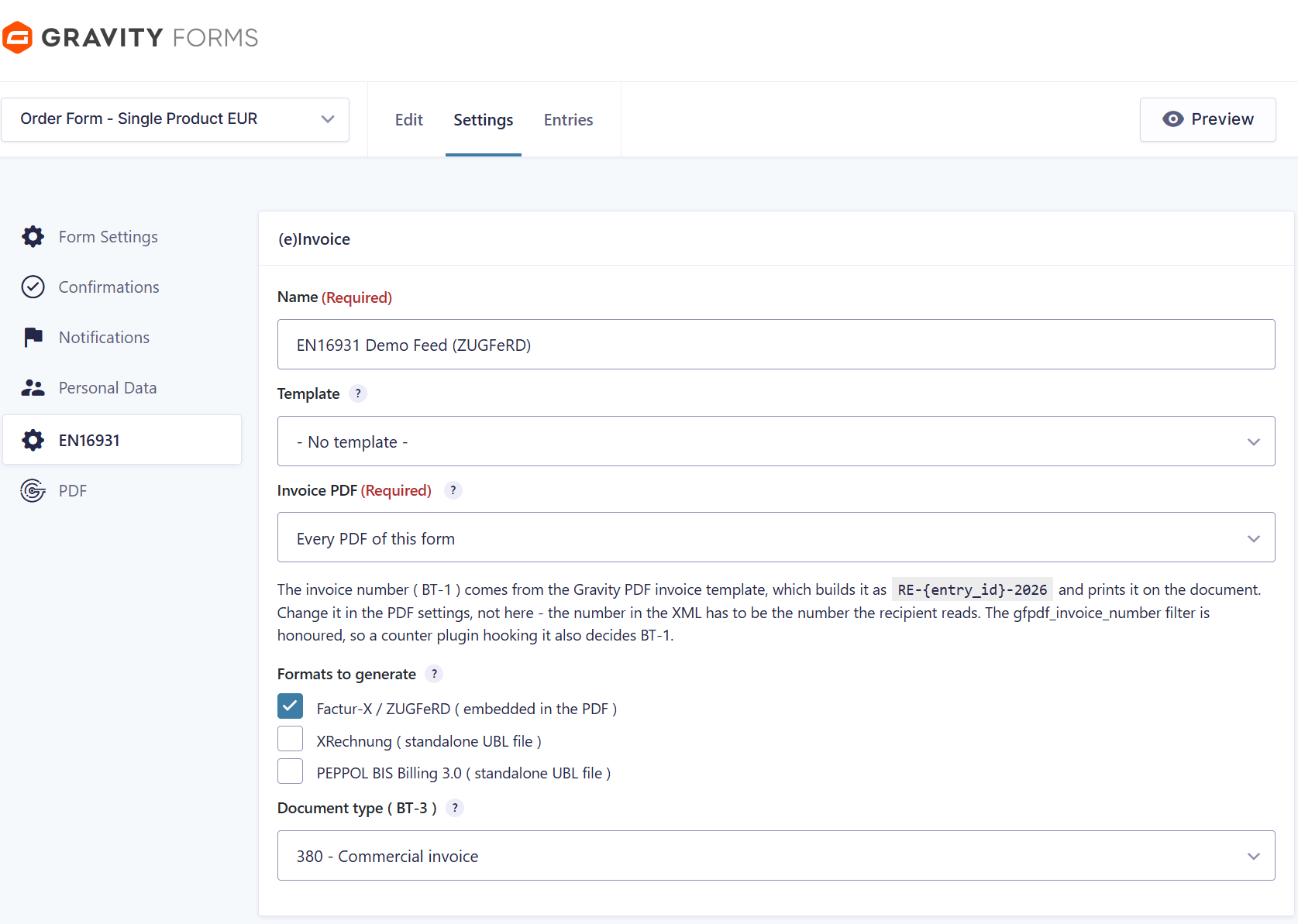
Factur-X / ZUGFeRD embeds the XML in the PDF, while XRechnung and PEPPOL BIS 3.0 are written as separate UBL files next to it. You choose any combination per feed.

03 Map the buyer with merge tags

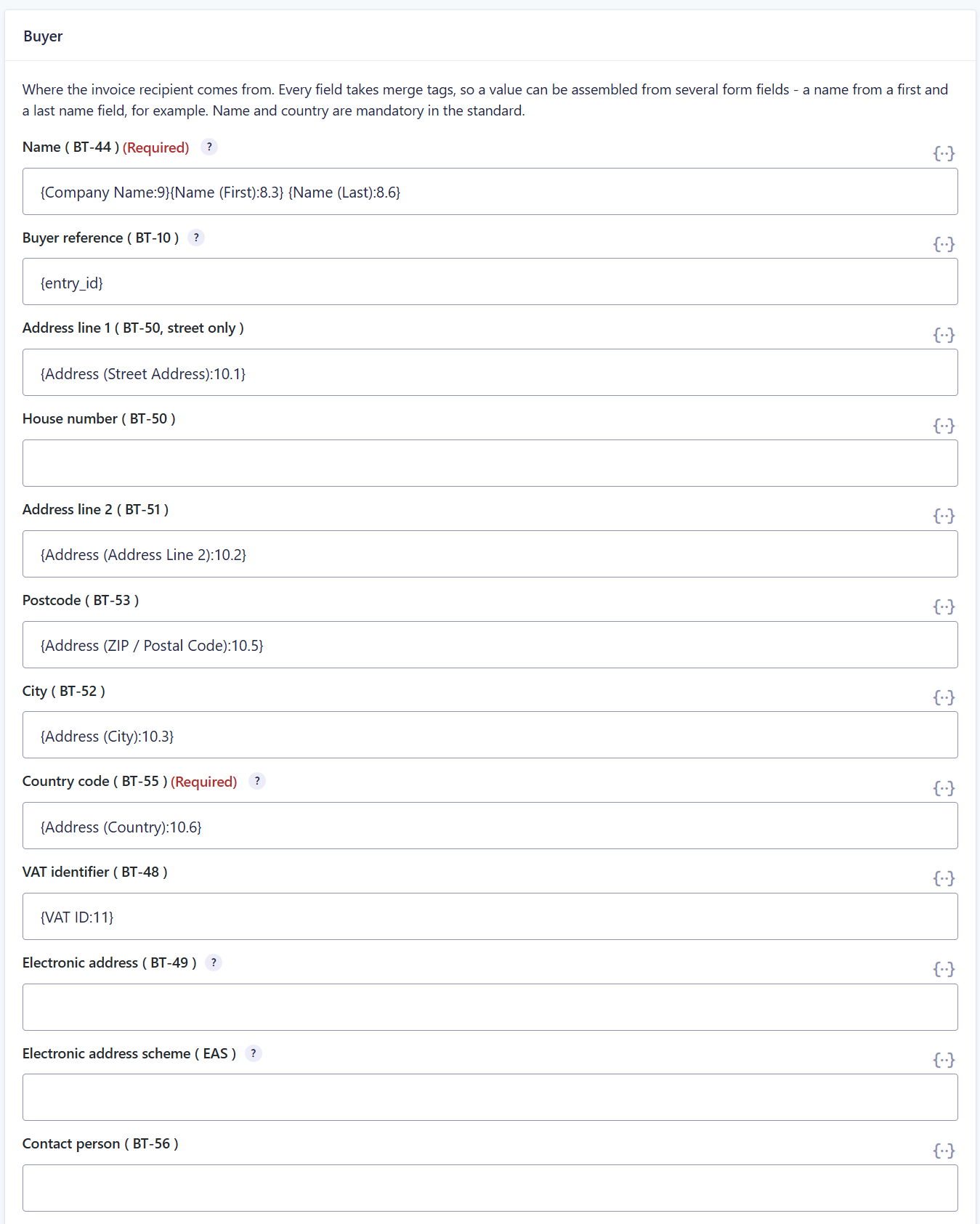
A merge tag is a placeholder like {Name:1} that Gravity Forms replaces with the entered value. Every buyer field accepts merge tags. This lets you assemble a value from several form fields, for example a name from a first name and a last name. The standard always requires the name and the country of the buyer.

04 Validate before you go live

The schema check finds errors in the structure, but not every breach of a business rule. So before you start, run one generated invoice through a validator that applies the validation rules, for example the official KoSIT validator. The KoSIT validator is the validation program of the German Coordination Office for IT Standards for XRechnung invoices. Also look at the invoice in the program your recipient actually uses.


The EN 16931 Seller page: you fill it in once, and every add-on of the family reads it.

The settings for Factur-X / ZUGFeRD with payment means, payment term and PDF/A-3 conformance level.

Two feeds on one form: one creates ZUGFeRD, the other PEPPOL BIS Billing 3.0.

The feed picks the formats. The invoice number comes from the Gravity PDF template, so the printed number and the field BT-1 of the XML are identical. BT-1 is the EN 16931 field for the invoice number.

The buyer side is mapped with merge tags. A value can be assembled from as many form fields as you need.

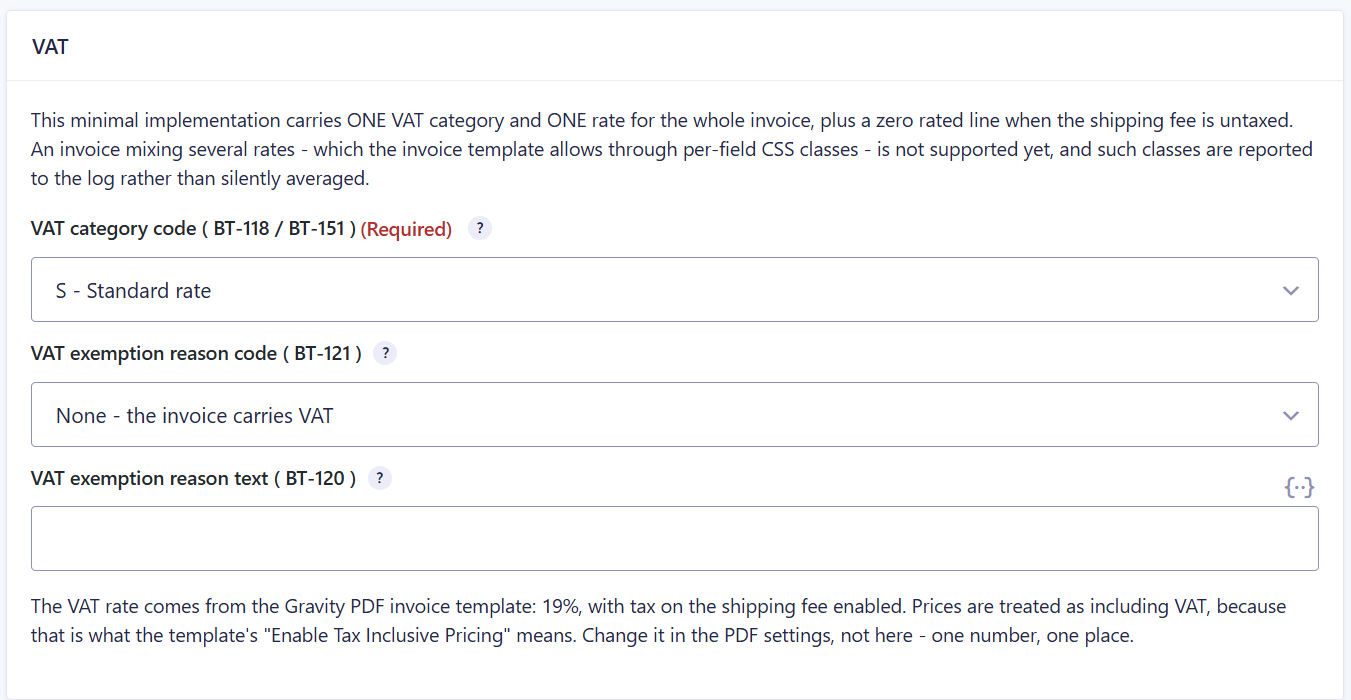
One VAT category and one VAT rate per invoice, plus the shipping line with a zero rate.


Manual

Everything to read up on.

The manual describes the installation, the first steps, every setting and special cases. It applies to version 2.6.9 of the add-on.


Goes well with

These extensions complement the add-on.

E-invoices from Gravity Forms

eInvoice Generator for Gravity Forms creates an invoice according to EN 16931 from a Gravity Forms entry. It writes the PDF and the XML itself and does not need Gravity PDF. This plugin is a paid product as well, available in the invoicePress.de shop.

EPC QR code

EPC-QR for Gravity PDF appends a payment page with a QR code for a SEPA credit transfer to the PDF. Your customer scans it with their banking app and does not have to type anything.

Swiss QR-bill

Swiss QR-Bill for Gravity PDF appends a complete Swiss QR-bill to the PDF, with a payment part and a receipt.

EN16931 fields

Gravity Forms EN16931 Fields brings 17 code lists of the e-invoice into Gravity Forms as ready-made choice fields. A code list is a defined list of allowed values, for example the currency codes.

eInvoice Generator for Gravity PDF
paid product: turns your PDF into an e-invoice
+ EPC QR code
paid product: payment page for a SEPA credit transfer
+ Swiss QR-bill
paid product: Swiss payment part with receipt
The add-on that creates the valid e-invoice and the two separate paid add-ons that add a payment QR code to the same PDF.

All e-invoice generators · All extensions


Which format does your recipient need?

It is usually fewer formats than people expect at the start. Business customers usually receive ZUGFeRD, public-sector buyers XRechnung, and recipients on the PEPPOL network a PEPPOL invoice. The demo will soon show you the finished result from a sample form. The add-on is a paid product, available in the invoicePress.de shop.